

Are you a farmer looking to get government support to buy a new tractor at a subsidized price? The Green Tractor Scheme online application is a golden opportunity, but many applicants get rejected simply due to incorrect form filling. Don’t worry — this guide will walk you through how to fill the Green Tractor Scheme Apply Online Application Request Form correctly, step by step, using the latest available information.
What Is the Green Tractor Scheme?
The Green Tractor Scheme is a Punjab government initiative designed to support small and medium farmers by providing tractors on heavy subsidies. Under this scheme, eligible farmers can apply online by submitting a simple application request form along with basic personal and tractor-related details.
Before You Start: Required Information
Before opening the online form, keep the following details ready to avoid mistakes or delays:
- Valid CNIC number
- Active mobile phone number (registered on your CNIC)
- Preferred tractor brand and model
- Stable internet connection
- Ability to read captcha code
Providing correct information is critical, as all applications are verified through official records.
Step-by-Step Guide to Fill Green Tractor Scheme Online Application Form
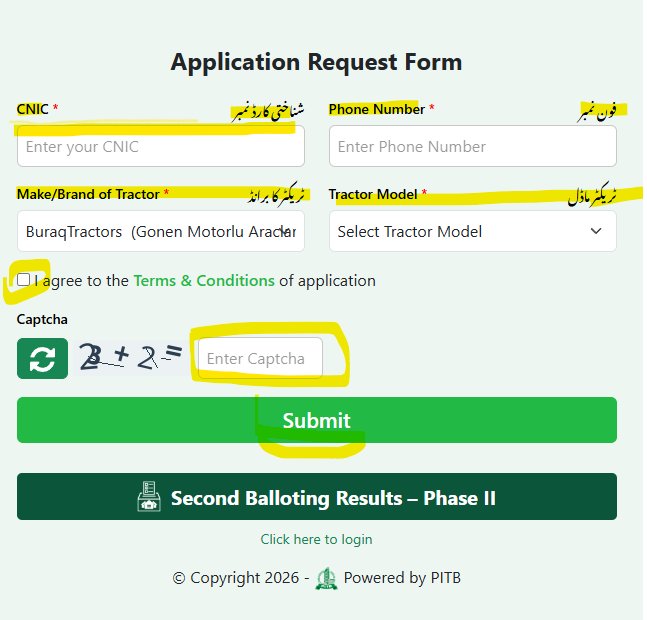
Step 1: Enter CNIC Number
In the first field labeled CNIC* (شناختی کارڈ نمبر):
- Enter your 13-digit CNIC number
- Do not use dashes (-)
- Make sure the CNIC belongs to the applicant (farmer)
Tip: Even a single wrong digit can cause automatic rejection.
Step 2: Provide Phone Number
Next, enter your mobile phone number (فون نمبر):
- Use an active SIM
- Preferably registered under your CNIC
- Double-check the number before submitting
This number is used for SMS updates and verification.
Step 3: Select Make / Brand of Tractor
From the dropdown list Make/Brand of Tractor* (ٹریکٹر کا برانڈ), choose one option carefully:
Available brands usually include:
- Millat Tractors Ltd. (Massey Ferguson)
- Al-Ghazi Tractors Ltd. (New Holland)
- Buraq Tractors
- GM Belarus Tractor Company
- Orient Automotives (Indigenous)
Choose the brand based on availability in your area and service network.
Step 4: Select Tractor Model
After selecting the brand, choose the Tractor Model (ٹریکٹر ماڈل):
- Models appear automatically after selecting the brand
- Select only the model approved under the scheme
- Avoid guessing — select exactly what is listed
Step 5: Agree to Terms & Conditions
Tick the checkbox “I agree to the Terms & Conditions of application”.
This confirms that:
- All provided information is correct
- You accept the government’s eligibility and verification rules
Step 6: Enter Captcha Code
Finally, enter the Captcha exactly as shown:
- Use correct uppercase/lowercase letters
- Refresh captcha if unclear
Captcha ensures that the application is submitted by a real user.
Step 7: Submit the Application
After reviewing all fields:
- Recheck CNIC and phone number
- Click Submit
- Save or screenshot the confirmation page for record
Application Request Form
Common Mistakes to Avoid
- Entering incorrect CNIC
- Using someone else’s phone number
- Selecting an unapproved tractor model
- Skipping captcha or terms & conditions
Avoiding these errors significantly increases approval chances.
Final Words
Applying for the Green Tractor Scheme online is simple if done correctly. By carefully filling the Application Request Form, choosing the right tractor brand, and submitting accurate details, you improve your chances of selection through the transparent lottery system.
Stay connected with official updates and keep your phone active for SMS alerts. This scheme is a major step toward empowering farmers and strengthening Pakistan’s agricultural future.
Good
Tractor green I need gifts